Using Labgrid and Pytest to Verify U-Boot Boot via JTAG
This document is a record for everything I encountered while using Labgrid to run OpenOCD and boot U-Boot over JTAG.
What do I need?
The flow should be like (assuming the coordinator and exporter are already set up):
- I need U-Boot-SPL and U-Boot binaries to exist on the coordinator.
- I need the client to be able to call bootstrap with two images, as in our case.
- I need to access the console and run a simple command to verify that it is functional.
- I need to be able to power-cycle the board, since I want to reproduce this flow.
- I need to utilize pytest so that this flow is automated and easy to integrate into CI.
I need U-Boot-SPL and U-Boot binaries to exist on the coordinator.
Before digging into the problem, to make this easier to understand, I created this diagram:
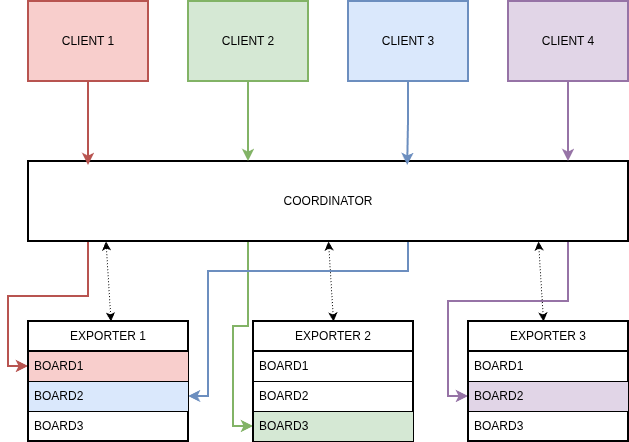
As you can see, when we connect to the exporters through the clients, we are actually connecting by notifying the coordinator. Any interaction between exporters and clients should be avoided. Each exporter needs a coordinator to be initialized anyway.
My point is that we basically cannot have a external(external from Labgrid api) connection between exporter and client for file transfer.
What can we do?
Labgrid solves this issue in different ways. The first way is to use either scp or rsync through the Labgrid client.
Labgrid-client rsync
transfer files via rsync
usage: Labgrid-client rsync [--name NAME] src dst
Labgrid-client scp
transfer file via scp
usage: Labgrid-client scp [--name NAME] src dst
We can also use the OpenOCD driver to send or copy files to the exporter. However, the current OpenOCD driver is limited to copying one file. It takes arguments like this:
Labgrid-client bootstrap
start a bootloader

usage: Labgrid-client bootstrap [-w WAIT] [--name NAME] filename ...
And we have to, and can only, transfer one file. That is not what we want, because the OpenOCD driver is probably designed to “bootstrap” by simply flashing one program and starting it.
But we want to “debug-load” the image; we are not flashing the image.
If we want to flash the image, we need to load it through a different path but this is something that we do not want to consider right now.
Also, if we can find a way to send images to exporter, the openOCD side is fine. Thats because we use u-boot.tcl to boot. It is a script that expects u-boot and u-boot-spl files in the directory where OpenOCD runs. We can call bootstrap command under Labgrid-client by passing “dummy” file and u-boot.tcl in the configs. This is the first workaround.
Let’s define the problem more clearly now: how can we send files to the exporter from the client, not only through OpenOCDDriver but through Labgrid in general?
The answer is either Labgrid-client scp or Labgrid-client rsync.
As you know, the Labgrid Python interface can be used as a Python library to manage and use Labgrid resources directly. I decided to inspect the Python API and look for what the OpenOCD driver uses to send data. It uses ManagedFile.
I can add an example here to show how simple it is.
#!/usr/bin/env python3

from Labgrid import Environment
from Labgrid.util.managedfile import ManagedFile

env = Environment("env.yaml")
target = env.get_target("main")

# Use the same remote resource OpenOCDDriver binds to.
interface = target.get_resource("NetworkUSBDebugger", name="jtag0")

for filename in ["build/u-boot-spl.bin", "build/u-boot.bin"]:
    mf = ManagedFile(filename, interface)
    mf.sync_to_resource()
    print(f"{filename} -> {mf.get_remote_path()}")
As you can see, by using the Python API and taking advantage of the NetworkUSBDebugger resource (this is the debugger instance that is connected to the exporter and is in the place we acquired as client), we can send data.
At the end, with this script, we are now able to send images to exporters. We also have the opportunity to call Labgrid-client scp or Labgrid-client rsync manually over cli.
I need the client to be able to call bootstrap with two images, as in our case.
This part is a bit tricky. Labgrid-client bootstrap [filename] is designed to take one file only.
It calls the OpenOCD driver with the features defined in env.yaml on the client side, such as:
options:
  coordinator_address: "your-coordinator-addr.com"

tools:
  openocd: "/usr/local/bin/openocd"

targets:
  main:
    resources:
      RemotePlace:
        name: "Munich/SC598-EZKIT-2"

    drivers:
      OpenOCDDriver:
        search:
          - "/usr/local/share/openocd/scripts"
        config:
          - "wrapper.cfg"
        load_commands:
          - "init"
          - "autoboot_elf"
          - "shutdown"
To explain it, wrapper.cfg is something I used to simplify the YAML file that contains the config files I want. These config files are directly related to the RemotePlace you selected, so they can be hardcoded.
To use this bootstrap command, we either change the OpenOCD driver API or give up on JTAG boot. We want JTAG boot, and for now we do not want to change the API.
As I mentioned before, u-boot.tcl expects two files with predefined names. Then, if the images are in the expected paths, we can call Labgrid-client bootstrap with a dummy file.
At this point, if a user wants to use CLI for manual testing, the current flow is:
python3 copy-files-to-exporter.py # or manually calling Labgrid-client scp/rsync
Labgrid-client -c env.yaml bootstrap /tmp/dummy
Before I made these commands operational, I solved several issues.
1 - Exporter Cache Permission
After acquiring the place:
(Labgrid-venv) odurgut@Precision-5570:~/Labgrid-tests$ Labgrid-client -c env.yaml acquire
Selected role main and place Munich/SC598-EZKIT-2 from configuration file
acquired place Munich/SC598-EZKIT-2
Running bootstrap failed:
(Labgrid-venv) odurgut@Precision-5570:~/Labgrid-tests$ Labgrid-client -c env.yaml bootstrap dummy
Selected role main and place Munich/SC598-EZKIT-2 from configuration file
Traceback (most recent call last):
  File "/home/odurgut/Labgrid/Labgrid-venv/lib/python3.12/site-packages/Labgrid/remote/client.py", line 2156, in main
....
Labgrid.driver.exception.ExecutionError: ('mkdir -p /var/cache/Labgrid/odurgut/e3b0c44298fc1c149afbf4c8996fb92427ae41e4649b934ca495991b7852b855/', [], ['mkdir: cannot create directory ‘/var/cache/labgrid’: Permission denied'])
(Labgrid-venv) odurgut@Precision-5570:~/Labgrid-tests$
This is an exporter-side permission problem triggered by the client.
The real error is:
mkdir: cannot create directory ‘/var/cache/labgrid’: Permission denied
That happens when ManagedFile tries to copy dummy from the client to the exporter host. It SSHes to the exporter and tries to create:
/var/cache/Labgrid/username/<sha256>/
The SSH user on the exporter does not have permission to create /var/cache/Labgrid.
Fix on the exporter host. The usual Labgrid setup creates /var/cache/Labgrid writable by the Labgrid group:
sudo mkdir -p /var/cache/Labgrid
sudo chgrp Labgrid /var/cache/Labgrid
sudo chmod 2775 /var/cache/Labgrid
Then log out/in on the exporter side, or restart the relevant user sessions.
Quick but less clean fix:
sudo mkdir -p /var/cache/Labgrid
sudo chmod 777 /var/cache/Labgrid
2 - Config File Path
After file copy worked, another bootstrap failure happened:
(Labgrid-venv) odurgut@Precision-5570:~/Labgrid-tests$ Labgrid-client -c env.yaml bootstrap dummy
Selected role main and place Munich/SC598-EZKIT-2 from configuration file
dummy
              0 100%    0.00kB/s    0:00:00 (xfr#1, to-chk=0/1)

sent 77 bytes  received 35 bytes  224.00 bytes/sec
total size is 0  speedup is 0.00
...
  File "/home/odurgut/Labgrid/Labgrid-venv/lib/python3.12/site-packages/Labgrid/util/managedfile.py", line 43, in __attrs_post_init__
    raise FileNotFoundError(f"Local file {self.local_path} not found")
FileNotFoundError: Local file /usr/local/share/openocd/scripts/target/adspsc59x_a55.cfg not found
(Labgrid-venv) odurgut@Precision-5570:~/Labgrid-tests$
The key point is that OpenOCDDriver treats entries in config: as local files to sync with ManagedFile. Therefore, a config path like /usr/local/share/openocd/scripts/target/ must exist on the client if it is listed directly in config:.
The fix was to pass a local config file that is synced to the exporter, and let OpenOCD resolve installed script paths through --search/source [find ...] on the exporter. It is safer, better, and easier to maintain for each board.
3 - OpenOCD USB Permission
OpenOCD then started but failed with a USB permission error:
Error: libusb_open() failed with LIBUSB_ERROR_ACCESS
Error: cannot connect to the debug agent
Temporary workaround used to unblock immediately:
sudo chmod -R a+rw /dev/bus/usb
This gives permission to each USB bus/device that Labgrid sees, but it is a workaround, not the clean long-term solution. A proper udev/group-permissions rule is preferable.
4 - Never forget to call shutdown hook in OpenOCD
Manual OpenOCD calls started to fail repeatedly:
Error: libusb_claim_interface failed: -6
Error: cannot connect to the debug agent
ozan@adi-lf-test:~>
I realized that OpenOCD stayed up if we do not add a shutdown hook in env.yaml.
load_commands:
  - "init"
  - "your_tcl_function_name"
  - "shutdown"
Please do not forget :)
5 - OpenOCD runs from your user’s home
OpenOCD bootstrap reached the Tcl script but failed to find the boot file:
ERROR: File not found: /home/ozan/u-boot-spl
shutdown command invoked
So it made me realize that the SSH user runs OpenOCD on the exporter. In the logs, Labgrid runs:
ssh adi-lf-test.local -- /usr/local/bin/openocd ...
With this SSH setup, that connects as ozan. So, OpenOCD starts with working directory as /home/ozan and the script looks for /home/ozan/u-boot-spl.
I need to access the console and test a simple command to verify that it is functional.
Okay, this part is mostly straightforward.
For the console, in exporter.yaml we have something like:
board2:
  location: "Munich"
  uart:
    cls: USBSerialPort
    match:
      "@ID_SERIAL": "Silicon_Labs_CP2102N_USB_to_UART_Bridge_Controller_8624ff6b1261ed11a8d3518009472825"
To call it through Labgrid-client:
Labgrid-client -c env.yaml console
In theory, it should be this straightforward. However, I had a TCP access problem, and others may also hit it.
1 - Console Direct TCP Access and Firewall Issue
The console command initially failed:
(Labgrid-venv) odurgut@Precision-5570:~/Labgrid-tests$ Labgrid-client -c env.yaml con
Selected role main and place Munich/SC598-EZKIT-2 from configuration file
connecting to NetworkSerialPort(target=Target(name='main', env=Environment(config_file='env.yaml')), name='uart', state=<BindingState.bound: 1>, avail=True, host='adi-lf-test.local', port=50011, speed=115200, protocol='rfc2217') calling /usr/bin/microcom -s 115200 -t adi-lf-test.local:50011
failed to connect: No route to host
connection lost
Normally, this can be solved by editing the exporter side as:
sudo firewall-cmd --add-port=50011/tcp
sudo firewall-cmd --add-port=50011/tcp --permanent
sudo firewall-cmd --reload
However, the port is not static. Therefore, we need to allow a range of ports.
I allowed a range of ports:
sudo firewall-cmd --add-port=40000-60000/tcp --permanent
sudo firewall-cmd --reload
Then I also restarted the exporter, of course.
sudo systemctl --user -M Labgrid@.host restart Labgrid-exporter.service
This is not the best solution, but it can unblock direct TCP console access when the exporter uses dynamic ports.
I need to be able to power-cycle the board since I want to reproduce this flow.
Power cycling is also one of the most straightforward actions. We can simply run:
Labgrid-client -c env.yaml power off
Labgrid-client -c env.yaml power on
or
Labgrid-client -c env.yaml power cycle
This can also be done through the Python API. It is easy and easy to integrate.
I need a pytest to make this flow automated and easy to integrate into CI.
After all this, the goal was to collect everything in a simple, structured pytest setup.
My goals were:
- Get
OpenOCDDriverfrom thetargetfixture. - Stage
u-boot-splandu-bootto the exporter working directory expected by the Tcl script. - Run
openocd.execute(openocd.load_commands). - Get
ConsoleProtocol. - Press enter and wait for
=>. - Send
printenv. - Pass if output is printed.
It is a simple verification test.
It booted as expected. However, after the prompt was found, UBootDriver activated and then run_check("printenv") failed. I got some help from LLMs at this point. Interestingly, as they said, “our” U-Boot did not expand shell-style $? in the way UBootDriver.run_check() expected. It printed the literal string "$?", so Labgrid tried to parse that as an integer return code and failed.
As a result, I used ConsoleProtocol under UBootDriver directly for printenv and checked the output that way.
Conclusions
In the end, I have a working flow to at least test whether U-Boot is working. As future work, I need to add verification of the bootstrap and debug images that we are distributing.
Possible and Probable Upstream Contributions
- Add ADI-specific device IDs in udev.py.
- Add an OpenOCD driver option to support running without a bootstrap file.
- Consider extending
OpenOCDDriverto support multiple files for JTAG boot workflows.